Unlocking Creative Precision: A Guide to Vector Brush and Stencil Sets for Digital Illustration
In the rapidly evolving landscape of digital design, the tools an artist chooses are just as critical as their raw talent. While raster-based software like Photoshop has long been the industry standard for painting and texturing, there is a growing movement toward vector-based workflows that offer unparalleled flexibility and scalability. At the heart of this workflow lies the Vector Brush Set, specifically collections that include specialized Stencil Brush Sets. For designers, illustrators, and hobbyists alike, understanding how these high-quality digital brushes function can transform a rigid design process into a fluid, dynamic creative experience.
This guide explores the significance of vector brushes, the unique utility of stencil techniques in a digital environment, and what makes a high-quality brush set essential for modern illustration. Whether you are a seasoned professional looking to streamline your workflow or a beginner navigating the world of Adobe Illustrator, understanding these assets is key to elevating your work.
Understanding Vector Brushes vs. Raster Brushes
To fully appreciate the value of a Vector Brush Set, one must first understand the fundamental difference between vector and raster graphics. Most digital artists begin their journey with raster programs where brushes apply pixels to a canvas. While beautiful, pixel-based art has limitations; zooming in reveals jagged edges, and resizing often results in quality loss.
Vector brushes, conversely, are mathematical constructs. When you apply a stroke using a vector brush in software like Adobe Illustrator, you are not laying down pixels but creating a path defined by anchor points and curves. This distinction offers several profound advantages:
- Infinite Scalability: A logo or illustration created with vector brushes can be scaled from the size of a business card to a billboard without any degradation in quality.
- Editability: Unlike a flattened raster layer, every brush stroke remains editable. You can adjust the width, color, curvature, and even the brush profile long after the stroke is made.
- Clean File Sizes: Because vectors rely on math rather than millions of colored pixels, file sizes remain manageable even for complex illustrations.
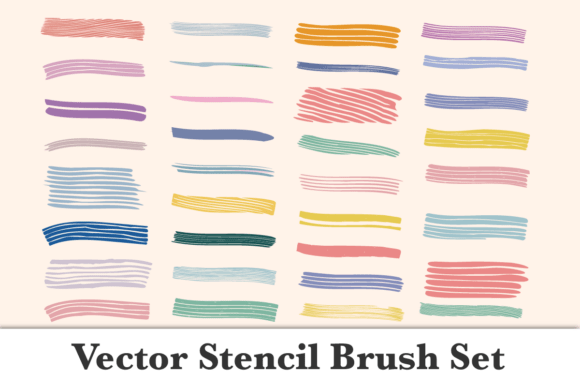
When we discuss High-Quality Digital Brushes for Design Illustration, we are referring to assets that leverage these vector properties to mimic organic textures while retaining technical perfection. This hybrid approach allows artists to achieve the hand-painted look of traditional media with the precision required for commercial design.
The Role of Stencil Brushes in Digital Art
A common misconception is that stencils are exclusively analog tools associated with street art or physical crafting. However, the Stencil Brush Set is a vital component of digital vector libraries. In a digital context, a stencil brush acts as a mask or a texture overlay that defines the negative space within a vector shape.
Why are stencil brushes necessary in a vector environment? Pure vector shapes can sometimes appear too sterile or "perfect." Stencil brushes introduce controlled imperfection. They allow designers to:
- Create Grunge and Texture: Apply distressed edges, spray paint effects, or worn textures that would be tedious to draw manually with a pen tool.
- Establish Visual Hierarchy: Use textured breaks in lines to guide the viewer’s eye and add depth to flat illustrations.
- Speed Up Workflow: Instead of drawing individual splatters or scratches, a single stroke with a stencil brush applies a complex pattern instantly.
For example, a poster designer creating a vintage concert flyer might use a clean vector font for readability but apply a stencil brush overlay to give it an authentic, weathered screen-print appearance. This combination of crisp typography and organic texture is a hallmark of modern professional illustration.
What Defines "High-Quality" in Digital Assets?
Not all brush sets are created equal. When searching for High-Quality Digital Brushes for Design Illustration, discernment is necessary. Low-quality vector brushes often suffer from excessive anchor points, which can cause software lag and make files difficult to edit. High-quality sets, however, are optimized for performance and aesthetic versatility.
A premium Vector Brush Set typically exhibits the following characteristics:
- Optimized Geometry: The brush definitions are constructed with the minimum number of anchor points necessary to maintain the shape, ensuring smooth rendering.
- Versatile Profiles: The set includes a variety of tip shapes, scatter settings, and pressure sensitivity profiles that respond naturally to tablet input.
- Seamless Integration: The brushes are formatted correctly for industry-standard software, preserving naming conventions and grouping structures.
- Commercial Licensing: Professional sets come with clear usage rights, allowing designers to use them in client work without legal ambiguity.
Investing in quality assets is not merely about aesthetics; it is about respecting your own time. Efficient tools reduce friction between the idea in your mind and the final output on the screen.
Practical Applications Across Industries
The utility of vector and stencil brush sets extends far beyond personal art projects. These tools are integral to various sectors of the creative economy:
Branding and Identity Design
Logos require absolute precision, yet many brands desire an artisanal feel. Vector brushes allow logo designers to create custom wordmarks and icons that possess unique character without sacrificing the scalability needed for merchandise, signage, and digital avatars.
Editorial and Publishing
Illustrators working for magazines, books, or digital publications often face tight deadlines. Stencil brushes enable rapid rendering of backgrounds and atmospheric elements, allowing artists to focus their energy on focal points and storytelling.
Apparel and Merchandise
Screen printing and embroidery require specific file preparations. Vector art is the native language of apparel manufacturing. Using vector stencil brushes ensures that designs translate perfectly to silk screens or digitized embroidery files without the need for manual tracing or redrawing.
Education and Tutorials
For educators teaching digital design, these brush sets serve as excellent teaching aids. They demonstrate how complex textures can be broken down into reusable components, helping students understand the modular nature of vector graphics.
Technical Specifications: What You Will Receive
When acquiring professional digital assets, clarity regarding deliverables is paramount. Compatibility and organization determine how quickly you can integrate new tools into your existing workflow. For this specific collection, transparency is key to ensuring user satisfaction.
WHAT YOU WILL RECEIVE – 1 .ai file
The delivery of a single .ai (Adobe Illustrator) file is significant for several reasons. The .ai format is the native source file for Adobe Illustrator, meaning it preserves all editable attributes of the brushes. Unlike generic exchange formats that might flatten effects or lose metadata, the .ai file ensures that:
- All brush definitions are intact and immediately accessible via the Brushes panel.
- Color swatches and global variables associated with the brushes are preserved.
- Layer structures and sample artwork demonstrating brush usage are included for reference.
This streamlined delivery method eliminates the confusion of managing multiple disparate files. It provides a plug-and-play solution for users who want to open the file and start creating immediately. For beginners, having a master .ai file also serves as a learning resource; by examining how the brushes are constructed within the file, aspiring designers can reverse-engineer techniques to eventually create their own custom tools.
Best Practices for Implementation
To maximize the potential of your Vector Brush Set - Stencil Brush Set, consider the following best practices:
- Use a Graphics Tablet: While mouse input works, vector brushes often have pressure-sensitive attributes that control width or opacity. A tablet unlocks the full expressive range of the set.
- Expand Only When Necessary: Keep your strokes "live" for as long as possible. Expanding a brush stroke converts it into static geometry, removing the ability to edit the path later. Only expand when preparing final files for print or export.
- Combine with Clipping Masks: Use stencil brushes inside clipping masks to contain textures within specific shapes. This non-destructive workflow maintains flexibility.
- Customize Your Presets: Don't hesitate to duplicate and modify the provided brushes. Adjusting spacing, rotation, or scatter settings can create entirely new variations tailored to your specific project needs.
Conclusion
The intersection of artistic expression and technical capability is where modern digital illustration thrives. A Vector Brush Set featuring dedicated stencil tools represents more than just a collection of digital accessories; it is a bridge between the organic warmth of traditional art and the rigorous demands of contemporary design. By understanding the underlying principles of vector graphics, recognizing the value of high-quality optimization, and utilizing the correct file formats, creatives can unlock new levels of efficiency and creativity.
Whether you are designing a global brand identity or exploring personal artistic growth, these tools provide the foundation for work that is both visually compelling and technically robust. We hope this overview helps you navigate your creative journey with confidence.
Thank you for your visit.