Transform Your Digital Art: Mastering the Sakura Procreate Brush Stamp Set
In the ever-evolving world of digital illustration, the balance between artistic expression and technical efficiency is paramount. For iPad artists using Procreate, finding tools that enhance creativity without consuming hours of manual labor is a constant pursuit. Enter the Sakura Procreate Brush Stamp set, a specialized collection designed to bridge the gap between intricate botanical detail and instant gratification. Whether you are designing greeting cards, creating seamless surface patterns, or adding delicate accents to a portrait, this brush set offers a streamlined workflow that respects both your artistic vision and your time.
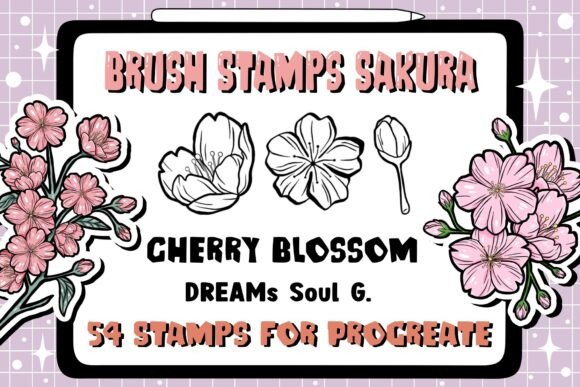
Digital art has democratized creativity, allowing professionals and hobbyists alike to produce studio-quality work from a tablet. However, rendering complex organic elements like cherry blossoms by hand can be tedious and repetitive. This is where stamp brushes revolutionize the process. By understanding how to leverage these 54 unique sakura stamps, artists can elevate their portfolios, meet tight commercial deadlines, and rediscover the joy of creation through efficient, high-quality assets.
The Significance of Stamp Brushes in Modern Digital Design
To fully appreciate the value of a dedicated Sakura Stamp Brush set, one must understand its role within the broader context of digital design. Unlike standard round brushes that require steady hand control to paint individual petals, stamp brushes function as intelligent texture applicators. They contain pre-rendered, high-resolution imagery mapped to the tip of your Apple Pencil. When you tap or drag across the canvas, you are not merely painting; you are placing curated artistic elements with precision.
This technology is particularly significant for pattern designers and stationery creators. In traditional media, creating a repeating floral pattern requires painting a motif, scanning it, and digitally manipulating it into a tile. With a comprehensive set of 54 sakura stamps, this multi-step process is condensed into a single layer of painting. You can build density, adjust spacing, and create natural variations in real-time. This immediacy allows for rapid prototyping, enabling artists to test colorways and compositions instantly before committing to a final render.
Furthermore, these brushes serve an educational purpose for beginners. By studying the structure of the stamps—how the petals overlap, how the stamens are positioned, and how the branches curve—aspiring illustrators can internalize botanical anatomy. The brush set acts as both a production tool and a visual reference library, helping users develop a stronger understanding of organic forms even as they utilize digital shortcuts.
Efficiency Meets Aesthetics: Saving Time Without Sacrificing Quality
A common misconception in the digital art community is that using stamps is "cheating" or results in generic-looking artwork. On the contrary, professional artists view stamp brushes as foundational elements rather than finished products. The true power of the Sakura Procreate Brush Stamp set lies in its ability to save your time on structural rendering so you can focus on lighting, color grading, and storytelling.
Consider the task of illustrating a spring-themed wedding invitation suite. Hand-painting dozens of individual cherry blossom clusters could take days. With this instant brush set, the base floral arrangement can be established in minutes. This efficiency does not result in uniformity because the set includes 54 distinct variations. Artists can rotate, resize, and recolor individual stamps to ensure no two sections look identical. The time saved on drawing basic shapes is reinvested into refining shadows, adding highlights, and integrating the florals seamlessly with typography.
This workflow optimization is crucial for freelancers and business owners who manage multiple client projects. In a commercial setting, speed is often synonymous with profitability. Having a reliable, high-quality asset library allows creatives to say "yes" to more opportunities without burning out. The Sakura Stamp Brush set transforms what was once a bottleneck into a fluid, enjoyable part of the creative process.
Technical Requirements and Compatibility
Before integrating this toolset into your workflow, it is essential to verify compatibility to ensure a smooth experience. Digital assets are software-specific, and misunderstanding system requirements is a frequent source of frustration for new users. This specific collection is engineered exclusively for the Procreate ecosystem.
- Hardware: An iPad Pro or standard iPad is required. While older models may function, newer iPads with higher processing power will handle large stamp sizes and complex blending modes more smoothly.
- Stylus: An Apple Pencil or a compatible pressure-sensitive stylus is necessary. Pressure sensitivity is key; it allows the stamp opacity or size to respond dynamically to your touch, creating more natural, organic placements compared to finger painting.
- Software Version: Procreate Version 5.0 or higher is mandatory. Earlier versions lack the advanced brush engine architecture needed to support the specific settings embedded in these custom stamps.
- File Format: The product is delivered as a ZIP file containing a .brushset file. This is the native container format for Procreate brush libraries.
It is important to emphasize that these brushes will only work within the Procreate application. They are not compatible with Photoshop, Clip Studio Paint, or other raster graphics editors. Ensuring your app is updated to the latest version before installation prevents import errors and guarantees access to all brush parameters.
Step-by-Step Installation Guide
Installing third-party brushes is a straightforward process, yet it remains a point of confusion for those transitioning from desktop software. Follow this logical sequence to safely install your Sakura Stamp Brush set and begin creating immediately.
- Download and Unzip: After purchasing or downloading the file, locate the ZIP archive in your iPad’s Files app. Tap the file to automatically extract the contents. You should see a file ending in .brushset.
- Open in Procreate: Tap the extracted .brushset file. A share sheet or menu will appear. Select "Open in Procreate." Do not attempt to drag the ZIP file directly into the app; it must be unzipped first.
- Automatic Import: Procreate will launch (or switch to the foreground) and automatically ingest the brush set. There is no manual copying or pasting into folders required.
- Locate in Library: Open the Brush Library panel. Scroll to the top or bottom of your category list (depending on your sorting preferences) to find the new "Sakura Stamp" group. It is now ready for use.
If the brush set does not appear immediately, restart the Procreate app. Occasionally, the library index needs a refresh to recognize new imports. Once installed, treat this set like any other native brush; you can duplicate, modify, or reorganize the stamps to suit your personal workflow.
Creative Applications: Cards, Patterns, and Beyond
The versatility of a 54-stamp collection extends far beyond simple decoration. Understanding the practical applications helps artists maximize their investment and explore new creative territories.
Greeting Card and Stationery Design
Cherry blossoms symbolize renewal and beauty, making them perennial favorites for weddings, birthdays, and spring holidays. Use larger stamps as focal points and smaller buds as filler elements. Experiment with blending modes like "Multiply" for watercolor effects or "Add" for ethereal, glowing blooms. Because the stamps are high-resolution, they print beautifully on physical cardstock without pixelation.
Seamless Pattern Creation
For textile and packaging designers, this set is a powerhouse. Utilize Procreate’s Drawing Assist guide to align stamps along grid lines. Rotate stamps at varying angles to avoid visible repetition. The sheer volume of 54 unique assets ensures that your patterns feel lush and hand-drawn rather than mechanical. These patterns can be exported for fabric printing, digital scrapbooking papers, or web backgrounds.
Mixed Media Illustration
Integrate sakura stamps into character art or landscapes to add atmospheric depth. Use low-opacity stamps in the background to suggest depth of field, or place crisp, detailed stamps in the foreground to frame a subject. The stamps also serve excellently as masking layers; paint inside a stamp shape to create textured silhouettes filled with galaxies, gradients, or text.
Embracing the Joy of Efficient Creation
Ultimately, tools like the Sakura Procreate Brush Stamp set exist to remove friction from the artistic process. Technology should serve the creator, not complicate their vision. By automating the repetitive aspects of botanical illustration, artists are free to enjoy the meditative flow state that makes digital art so rewarding.
Whether you are a seasoned professional looking to streamline your commercial workflow or a beginner eager to create beautiful cards for loved ones, this brush set offers a safe, accessible entry point into complex illustration. Remember to respect the tool's capabilities while infusing every piece with your unique stylistic choices. Download, install, and let the 54 sakura stamps transform your blank canvas into a blooming masterpiece. Thank you for exploring the intersection of tradition and technology in your digital art journey.