Integrating the Free Easter Bunny Procreate Brush Set into Seasonal Design Workflows
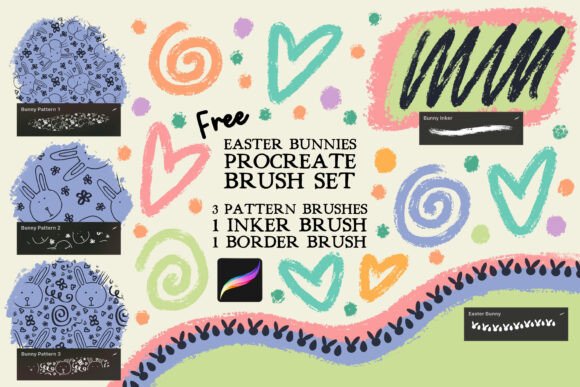
Seasonal design projects often require a delicate balance between festive aesthetics and professional execution. For digital illustrators, surface pattern designers, and content creators working within the Apple ecosystem, the Free Easter Bunny Procreate Brush Set serves as a specialized asset library designed to streamline this specific niche. This collection is not merely a set of decorative stamps; it is a functional toolkit comprising three seamless tiling pattern brushes, one dedicated inker brush, and one border brush. Understanding how to integrate these specific tools into your existing production pipeline can significantly reduce the time spent on repetitive detailing while maintaining high-quality output for client work, personal portfolios, or print-on-demand products.
Technical Compatibility and Asset Management
Before incorporating new assets into a live project, verifying technical compatibility is essential for workflow efficiency. It is critical to note that the Free Easter Bunny Procreate Brush Set is engineered exclusively for the Procreate app on iPad. These files utilize proprietary brush engine parameters that do not translate to Adobe Photoshop, Affinity Designer, or other raster graphics software. Attempting to force these files into incompatible programs will result in errors or loss of functionality.
For professionals managing multiple seasonal asset packs, organization prevents friction during active creation. Upon downloading, import the .brushset file directly into Procreate. Rather than leaving it in the default imported folder, consider renaming the set to include a prefix like "Easter_2024" or moving it into a dedicated "Seasonal Assets" group. This small administrative step ensures that when you are mid-flow on a deadline-driven illustration, you can locate the specific inker or pattern brush without scrolling through unrelated general-purpose libraries. Proper asset management at the outset preserves mental bandwidth for creative decision-making later in the process.
Leveraging Seamless Tiling Patterns for Surface Design
The core utility of this set lies in its three seamless tiling pattern brushes. In a commercial context, these are invaluable for creating background textures, wrapping paper designs, or textile prints where continuity is paramount. Unlike manually stamping individual elements and hoping they align, these brushes have been pre-calculated to repeat perfectly along both the X and Y axes.
To maximize efficiency during the drafting phase, use these pattern brushes on a separate layer beneath your primary focal points. This allows you to establish visual rhythm and density early in the process without committing to final colors. Because the patterns are seamless, you can scale the brush size up or down to adjust the motif density relative to your canvas dimensions without breaking the tile logic. For entrepreneurs creating print-on-demand merchandise, this feature drastically reduces the setup time required for all-over print products like phone cases or tote bags. You can generate a consistent, professional-grade Easter theme in seconds, allowing more time to focus on unique typography or custom central illustrations that differentiate your product from generic marketplace listings.
Workflow Integration: Backgrounds and Textures
When using the tiling brushes for backgrounds, consider the hierarchy of your composition. A common mistake is applying the pattern at full opacity, which competes with foreground elements. Instead, integrate the pattern brush as a textural foundation. Apply the stroke, then utilize Procreate’s layer blending modes—such as Multiply or Overlay—to merge the bunny motifs with solid color blocks or gradients. This approach maintains the festive spirit while ensuring readability for any overlaid text or marketing copy. For educators creating worksheets or activity books, these seamless patterns provide engaging borders and fillers that keep young audiences interested without overwhelming the educational content.
Precision Inking and Line Art Consistency
The included inker brush addresses a different stage of the production pipeline: refinement and definition. While the pattern brushes handle broad coverage, the inker is designed for controlled line weight and crisp edges. In professional illustration, consistency in line quality signals attention to detail. This specific inker has been calibrated to respond to Apple Pencil pressure and tilt, offering predictable tapering that mimics traditional media while retaining digital editability.
Use this brush during the cleanup phase after blocking out shapes with standard round brushes. Its texture profile complements the Easter theme, providing lines that feel organic rather than sterile vector paths. For freelancers delivering assets to clients who may request revisions, keeping line art on a dedicated layer using this specific brush ensures that adjustments can be made non-destructively. If a client requests a change in line weight or style, having used a specialized tool makes it easier to identify and modify those specific strokes without affecting the underlying color work or background patterns.
Framing and Composition with the Border Brush
The border brush included in this set solves a frequent compositional challenge: framing content effectively. Whether designing social media templates, greeting cards, or digital invitations, defining the boundary of the artwork helps guide the viewer’s eye toward the center. The border brush in the Free Easter Bunny Procreate Brush Set is optimized for corner-to-corner application, reducing the guesswork involved in manual placement.
In a practical workflow, apply the border near the end of the process. This acts as a containment field that unifies disparate elements. For marketers creating Instagram Stories or Pinterest pins, this border provides instant thematic context, signaling "Easter" immediately even if the central image is abstract. When implementing this tool, ensure your canvas margins account for safe zones, especially if the final output is intended for print. Drawing the border too close to the edge risks it being trimmed during production. Utilizing guides in Procreate alongside this brush ensures professional spacing and alignment every time.
Strategic Application Across Different Roles
The versatility of this brush set extends beyond pure illustration. Understanding how different professionals can leverage these tools highlights their broader utility:
- Small Business Owners: Create cohesive seasonal branding across packaging stickers, thank-you cards, and email newsletters without hiring an external designer. The seamless patterns ensure brand consistency across different physical and digital touchpoints.
- Educators and Homeschoolers: Develop custom learning materials with festive borders and backgrounds that maintain engagement. The inker brush is particularly useful for creating clear, legible tracing lines for handwriting practice sheets.
- Digital Planners and Journalers: Design reusable digital stickers and page templates. The tiling nature of the pattern brushes allows for quick creation of washi tape effects and digital scrapbooking elements.
- Publishers and Self-Publishers: Generate interior decorations for children’s books or seasonal anthologies. The ability to create consistent spot illustrations and chapter headers using the same brush set maintains visual coherence throughout a publication.
Quality Control and Final Output Considerations
While free assets accelerate production, quality control remains the responsibility of the creator. Always test the brushes at the actual resolution intended for final output before beginning detailed work. Brushes that look crisp at 2000px may show pixelation or aliasing artifacts at 6000px, or conversely, lose detail when scaled down for web use. Create a test swatch using the inker and pattern brushes at your target DPI to verify performance.
Additionally, consider color management. Since these brushes define shape and texture rather than hue, they are fully compatible with any color palette. However, to maintain a professional aesthetic, avoid relying solely on default colors. Build a custom Easter-specific palette that aligns with current design trends or specific client brand guidelines before applying the brushes. This separation of form (brush) and color (palette) enhances flexibility and ensures the final piece feels curated rather than templated.
Expanding Your Resource Library
This free set functions as an excellent entry point for evaluating how themed brushes fit into your personal workflow. As your needs evolve or as you take on more complex commercial projects requiring varied styles, expanding your toolkit becomes necessary. Maintaining a relationship with reliable resource providers ensures access to high-quality, compatible assets over time. Be sure to check out my shop here on Creative Fabrica for more Procreate brush sets and freebies that complement this Easter collection. Exploring additional resources allows you to build a comprehensive library that covers various seasons, styles, and technical requirements, ultimately making your creative business more resilient and adaptable to market demands.
By treating the Free Easter Bunny Procreate Brush Set as a professional instrument rather than a novelty, you transform seasonal creativity from a chaotic rush into a structured, efficient process. From initial asset organization to final quality checks, each component of this set has a distinct role in producing polished, market-ready work. Whether you are illustrating a book cover, designing retail packaging, or simply enhancing your digital journal, these tools provide the technical foundation needed to execute your vision with confidence and speed.