Integrating 100 Potion Halloween Photoshop Brushes into Professional Creative Workflows
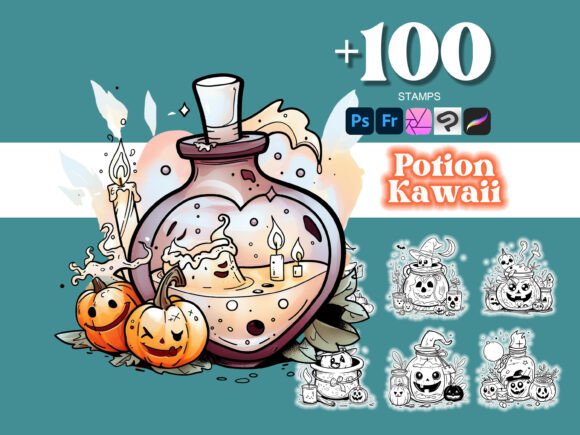
Seasonal design projects often require a delicate balance between thematic relevance and professional execution. For designers, illustrators, and content creators, the challenge lies in producing high-quality autumnal assets without spending excessive hours hand-drawing repetitive elements. The 100 Potion Halloween Photoshop collection addresses this specific bottleneck by providing a comprehensive library of pre-rendered, high-resolution assets that integrate directly into existing production pipelines. Rather than viewing these brushes merely as decorative add-ons, professionals should approach them as modular components that accelerate the concepting, rendering, and finalization phases of digital artwork.
This asset pack functions as a bridge between raw ideation and polished deliverables. By utilizing over 100 professional-quality .abr files, creators can maintain visual consistency across multiple projects while significantly reducing manual labor. Whether you are designing merchandise for a small business, creating educational materials, or developing digital art for publication, understanding how to implement these tools effectively is key to maximizing return on investment and maintaining creative momentum during busy seasonal periods.
Pre-Production Planning and Asset Organization
Efficient integration begins before the first stroke is applied to the canvas. Successful implementation of the 100 Potion Halloween Photoshop set requires proper file management and workspace preparation. Because this collection includes both standard Photoshop brushes and a bonus Procreate .brushset, organizing your asset library ensures seamless transitions between desktop and tablet environments.
- Centralized Asset Management: Store the master .abr files in a cloud-synced folder or a dedicated design resource directory. This allows for quick reinstallation if you switch workstations or need to share resources with a team member.
- Brush Grouping Strategy: Upon installation, avoid leaving all 100 brushes in a single default group. Categorize them within the Brush Settings panel by function (e.g., "Liquid Effects," "Glass Containers," "Smoke & Mist," "Labels"). This reduces cognitive load during active design sessions.
- Cross-Platform Syncing: For users who sketch on iPad and finish on desktop, test the bonus Procreate brushes immediately. Verify that the texture scaling matches your Photoshop workflow to ensure that concepts developed on mobile translate accurately to the final high-resolution file.
Preparation also involves understanding the technical specifications of the brushes. These are designed for crisp results, meaning they retain integrity at high resolutions. Before starting a project, confirm your document DPI settings align with the brush resolution to prevent pixelation or unnecessary file bloat.
Accelerating the Concepting Phase
In the early stages of a project, speed is often more valuable than perfection. The primary utility of this collection during concepting is rapid visualization. Instead of spending hours rendering a single potion bottle to test a color palette or composition, designers can use these brushes to block out complex scenes in minutes.
This capability is particularly useful for client presentations and mood boards. When pitching a Halloween-themed campaign to stakeholders, using detailed, professional-grade placeholders helps convey the final vision more effectively than rough sketches. The intricate designs included in the set allow for immediate feedback on style and tone. If a client responds positively to a specific type of apothecary aesthetic present in the brush set, you have already validated a significant portion of the visual direction before committing to custom illustration.
Furthermore, these brushes serve as excellent reference material. Even if you intend to paint custom assets later, stamping down a few potion shapes can help establish lighting scenarios, liquid dynamics, and shadow placement. This acts as a structural underpainting, guiding subsequent manual refinements and ensuring anatomical and physical accuracy in fantastical elements.
Execution and Technical Implementation
During the production phase, the 100 Potion Halloween Photoshop brushes should be treated as foundational layers rather than final solutions. Professional workflows demand uniqueness; therefore, direct stamping without modification can lead to generic results. Integrating these assets effectively requires a layered approach that combines automation with artistic intent.
Layer Management and Non-Destructive Editing
Always apply brush stamps on separate layers. This isolation allows for non-destructive editing using adjustment layers, masks, and blending modes. For example, a single black ink potion brush can be transformed into a glowing neon elixir by applying a Color Balance adjustment layer clipped to the brush layer, followed by an Outer Glow layer style. This method preserves the original high-quality texture while adapting it to the specific lighting conditions of your unique composition.
Combining Tools for Custom Results
The true power of this collection emerges when combined with other Photoshop tools. Use the Eraser tool with soft edges to blend stamped potions into painted backgrounds, removing hard digital edges. Utilize the Liquify filter to alter the shape of bottles or the flow of liquids, ensuring no two instances look identical. Overlay custom textures or grain filters on top of the brush strokes to unify them with the rest of your artwork, preventing the "sticker sheet" appearance that often plagues digital composites.
Cross-Program Compatibility Considerations
While optimized for Photoshop, the .abr format offers cross-program compatibility with software like Affinity Photo, GIMP, and Krita. However, users must be aware of potential translation differences. Brush spacing, flow dynamics, and texture alignment may vary between engines. When working in alternative software, treat the imported brushes as static stamps rather than dynamic tools, and rely on native program features for blending and smoothing. Illustrator users can import these raster brushes but should consider using Image Trace or manual vectorization if scalable output is required for large-format printing.
Post-Production and Quality Control
After the main design work is complete, a rigorous quality control pass is essential when using pre-made assets. Zoom in to 100% to inspect edges and texture consistency. Ensure that the resolution of the brushed elements matches the surrounding artwork. If a potion brush appears softer than adjacent hand-painted elements, apply subtle sharpening or contrast adjustments to integrate it visually.
Consistency checks are equally important. Verify that light sources are uniform across all stamped elements. A common error in composite work is having shadows falling in different directions because various brushes were used without modification. Use dodge and burn techniques to correct lighting inconsistencies, reinforcing the illusion that all elements exist in the same three-dimensional space.
For commercial projects, review the licensing terms associated with the collection. Understanding usage rights prevents legal complications down the line. Document which assets were used in specific deliverables to streamline future revisions or portfolio updates. Maintaining a record of asset utilization also aids in evaluating the ROI of the purchase for future budget planning.
Expanding Utility Beyond Digital Art
The application of these brushes extends beyond traditional digital illustration. Their high-resolution nature makes them suitable for various physical and hybrid media workflows.
- Tattoo Design: Artists can use these brushes to quickly prototype flash sheets or stencil layouts. The intricate line work serves as a reliable base for custom tattoo designs, allowing artists to focus on personalization and placement rather than drafting basic vessel shapes from scratch.
- Craft and Print Production: Small business owners creating stickers, apparel, or packaging can utilize these assets to generate consistent branding elements. The crisp details ensure clean cuts for vinyl plotters and sharp impressions for screen printing screens.
- Educational Content: Educators and textbook designers can create engaging visual aids for chemistry, history, or literature classes. The thematic nature of the set makes abstract concepts more tangible and visually appealing for students.
Long-Term Workflow Integration
Sustainable creative practices involve building reusable systems. The 100 Potion Halloween Photoshop collection should be viewed as a long-term asset library rather than a single-use seasonal prop. Many of the included designs—glassware, liquids, smoke, and organic textures—are applicable year-round in fantasy, sci-fi, and still-life genres.
Consider creating custom actions or smart objects based on your favorite brushes from this set. If you frequently use a specific cauldron or vial, convert it into a Smart Object with embedded adjustment layers. This creates a personalized, parametric asset that adapts instantly to new color schemes or lighting setups, further streamlining future projects.
Additionally, the inclusion of the Procreate .brushset encourages a hybrid workflow that maximizes flexibility. Capturing ideas on mobile during downtime and refining them on desktop during focused work sessions creates a continuous creative loop. This portability ensures that inspiration is never lost due to hardware limitations, making the collection a versatile companion for modern, multi-device creators.
Ultimately, the value of this product collection lies in its ability to remove technical friction from the creative process. By handling the tedious aspects of rendering complex textures and shapes, it frees up mental bandwidth for higher-level design decisions. When integrated thoughtfully with proper organization, technical adaptation, and quality control, these brushes become an indispensable part of a professional toolkit, enabling faster turnaround times and consistently high-quality seasonal outputs.